kmp-auto
The Unified In-Car Automotive Framework for Android Auto, Android Automotive OS & Apple CarPlay in Kotlin Multiplatform.





Overview
Automotive application development differs fundamentally from standard mobile UI development: vehicle head units do not render arbitrary canvas or freeform views. Due to strict driver distraction regulations established by the NHTSA (National Highway Traffic Safety Administration) and vehicle manufacturers, both Google and Apple mandate host-rendered, template-based architectures:
- Android Auto & Android Automotive OS (AAOS): All in-car screens must be expressed through
androidx.car.appdeclarative templates (ListTemplate,PaneTemplate,GridTemplate,MessageTemplate,SearchTemplate), rendered by the car's system host (com.google.android.apps.automotive.templates.host). - Apple CarPlay: All in-car views must conform to
platform.CarPlaytemplate hierarchies (CPListTemplate,CPInformationTemplate,CPGridTemplate,CPAlertTemplate,CPSearchTemplate), managed through aCPInterfaceControllerwithin aCPTemplateApplicationScene.
Traditionally, mobile engineering teams had to design, implement, and maintain two completely isolated native automotive codebases. Despite the conceptual models being virtually identical, zero navigation logic, backstack safety handling, or reactive state flows could be shared across platforms.
kmp-auto solves this fragmentation: it provides a unified, declarative in-car architecture in commonMain that projects symmetrically to native Android Auto and Apple CarPlay surfaces at runtime.
Architectural Flywheel
flowchart TD
    subgraph Shared ["1. commonMain (100% Shared In-Car Core)"]
        Screen["AutoScreen\n(Declarative UI Lifecycle)"]
        Nav["AutoNavigator\n(Stack State & Pop Operations)"]
        Guard["BackstackGuard\n(Enforces NHTSA 5-step limit)"]
        Templates["Declarative Templates\n(List · Grid · Pane · Message · Search · TabBar)"]
    end

    subgraph PlatformEngines ["2. Native Platform Projection Engines"]
        AndroidEngine["androidMain\nAndroidTemplateMapper\nAndroidNavigatorAdapter"]
        IosEngine["iosMain\nIosTemplateMapper\nIosNavigatorCoordinator"]
    end

    subgraph NativeHosts ["3. In-Car System Hosts"]
        AAOS["Android Auto / AAOS\n(androidx.car.app Host Renderer)"]
        CarPlay["Apple CarPlay\n(CPTemplateApplicationScene)"]
    end

    Screen --> Templates
    Nav --> Guard
    Templates --> AndroidEngine
    Templates --> IosEngine
    AndroidEngine --> AAOS
    IosEngine --> CarPlay
Core Design Directives
- Strict Multiplatform Boundary Hygiene:
commonMaincontains zero imports fromandroid.*orplatform.CarPlay.*. Platform engines operate strictly as reactive projection mappers. - Backstack Safety Engine (
BackstackGuard): Automotive displays enforce strict navigation depth limits (typically 5 screens). Exceeding this limit causes immediate runtime crashes or host rejection.BackstackGuardautomatically intercepts deep pushes with configurable policies (REPLACE_TOP,THROW_EXCEPTION,IGNORE). - Reactive Invalidation Pipeline: In-car screens declare reactive dependencies using Kotlin Coroutines
StateFlow. When internal screen state updates,kmp-autoautomatically triggersscreen.invalidate()on Android Auto andupdateSections()on CarPlay.
Template Equivalency Matrix
kmp-auto bridges every official in-car template symmetrically between Android Auto and Apple CarPlay:
kmp-auto Template (commonMain) |
Android Auto / AAOS (androidx.car.app) |
Apple CarPlay (platform.CarPlay) |
In-Car Use Cases |
|---|---|---|---|
AutoListTemplate |
ListTemplate |
CPListTemplate |
POI directories, charging stations, playlists, transaction history |
AutoGridTemplate |
GridTemplate |
CPGridTemplate |
Quick controls, drive modes, climate shortcuts, media categories (max 8 buttons) |
AutoPaneTemplate |
PaneTemplate |
CPInformationTemplate |
Vehicle diagnostics, battery status, order summaries + action buttons |
AutoMessageTemplate |
MessageTemplate |
CPAlertTemplate |
Urgent driver warnings, trip completion, active charging progress |
AutoSearchTemplate |
SearchTemplate |
CPSearchTemplate |
In-car destination search with on-screen keyboard & voice input |
AutoTabBarTemplate |
TabTemplate |
CPTabBarTemplate |
Root application shell with 4-5 category tabs (Explore, Favorites, Settings) |
AutoPointOfInterestTemplate |
PlaceListMapTemplate |
CPPointOfInterestTemplate |
Interactive map markers, charging pins, and POI detail cards |
Integration with kmp-cli
kmp-auto is natively integrated into the KMP CLI & Zora Kits Hub ecosystem through two complementary avenues:
1. Turnkey Automotive Scaffolding (kmp create)
Scaffold a complete, production-ready automotive application with pre-wired Android Automotive OS manifests and Apple CarPlay Scene Delegates:
# Verify host environment (Android SDK, AAOS emulator, Xcode)
kmp doctor --architecture

# Scaffold a turnkey in-car project
kmp create MyCarApp --template kmp-auto --package com.example.carapp
The scaffolded template includes:
* Android Automotive OS Shell: minSdk 29, CarAppActivity, automotive_app_desc.xml, and CarAppService binding.
* Apple CarPlay Shell: CPTemplateApplicationSceneDelegate, Info.plist scene manifest, and -framework CarPlay linking.
* Shared Showcase Core: Turnkey catalog screen demonstrating List, Grid, Pane, and Message flows ready to run.
2. Automated Agent Skills Provisioning (kmp skills)
When scaffolding an automotive project with kmp create --template kmp-auto, the project automatically provisions companion skills into the workspace for AI coding agents:
Available automotive skills:
* kmp-auto-expert: In-car architecture rules, template selection matrix, and NHTSA safety guidelines.
* carplay: Apple CarPlay template hierarchies, entitlements configuration, and CarPlay Simulator testing.
* android-cli: Automated Android Virtual Device (AVD) management and AAOS emulator launching.
Quick Start & Code Example
Defining an In-Car Screen in commonMain
import io.github.kmpauto.core.components.AutoAction
import io.github.kmpauto.core.components.AutoListItem
import io.github.kmpauto.core.navigation.AutoNavigator
import io.github.kmpauto.core.navigation.AutoScreen
import io.github.kmpauto.core.template.AutoListTemplate
import io.github.kmpauto.core.template.AutoTemplate

class StationListScreen(
    private val navigator: AutoNavigator
) : AutoScreen() {

    override fun render(): AutoTemplate {
        val items = listOf(
            AutoListItem(
                title = "Reforma Supercharger",
                subtitle = "8 stalls available · 250 kW",
                onClick = {
                    navigator.push(StationDetailScreen(navigator, "Reforma Supercharger"))
                }
            ),
            AutoListItem(
                title = "Polanco Fast Charger",
                subtitle = "4 stalls available · 150 kW",
                onClick = {
                    navigator.push(StationDetailScreen(navigator, "Polanco Fast Charger"))
                }
            )
        )

        return AutoListTemplate(
            title = "Charging Stations",
            items = items,
            headerAction = AutoAction(
                title = "Back",
                onClick = { navigator.pop() }
            )
        )
    }
}
import io.github.kmpauto.core.components.AutoAction
import io.github.kmpauto.core.components.AutoPaneItem
import io.github.kmpauto.core.navigation.AutoNavigator
import io.github.kmpauto.core.navigation.AutoScreen
import io.github.kmpauto.core.template.AutoPaneTemplate
import io.github.kmpauto.core.template.AutoTemplate

class StationDetailScreen(
    private val navigator: AutoNavigator,
    private val stationName: String
) : AutoScreen() {

    override fun render(): AutoTemplate {
        return AutoPaneTemplate(
            title = stationName,
            items = listOf(
                AutoPaneItem(title = "Status", value = "Available"),
                AutoPaneItem(title = "Power Output", value = "250 kW DC Fast"),
                AutoPaneItem(title = "Pricing", value = "$4.50 / kWh")
            ),
            actions = listOf(
                AutoAction(
                    title = "⚡ Start Charging",
                    isPrimary = true,
                    onClick = {
                        navigator.push(ChargingActiveScreen(navigator))
                    }
                )
            ),
            headerAction = AutoAction(
                title = "Back",
                onClick = { navigator.pop() }
            )
        )
    }
}
import io.github.kmpauto.core.components.AutoAction
import io.github.kmpauto.core.navigation.AutoNavigator
import io.github.kmpauto.core.navigation.AutoScreen
import io.github.kmpauto.core.template.AutoMessageTemplate
import io.github.kmpauto.core.template.AutoTemplate

class ChargingActiveScreen(
    private val navigator: AutoNavigator
) : AutoScreen() {

    override fun render(): AutoTemplate {
        return AutoMessageTemplate(
            title = "Charging in Progress",
            message = "65% completed · 18 min remaining to 80% (48 kWh delivered)",
            actions = listOf(
                AutoAction(
                    title = "Stop Charging",
                    onClick = { navigator.popToRoot() }
                )
            )
        )
    }
}
Live Automotive Verification
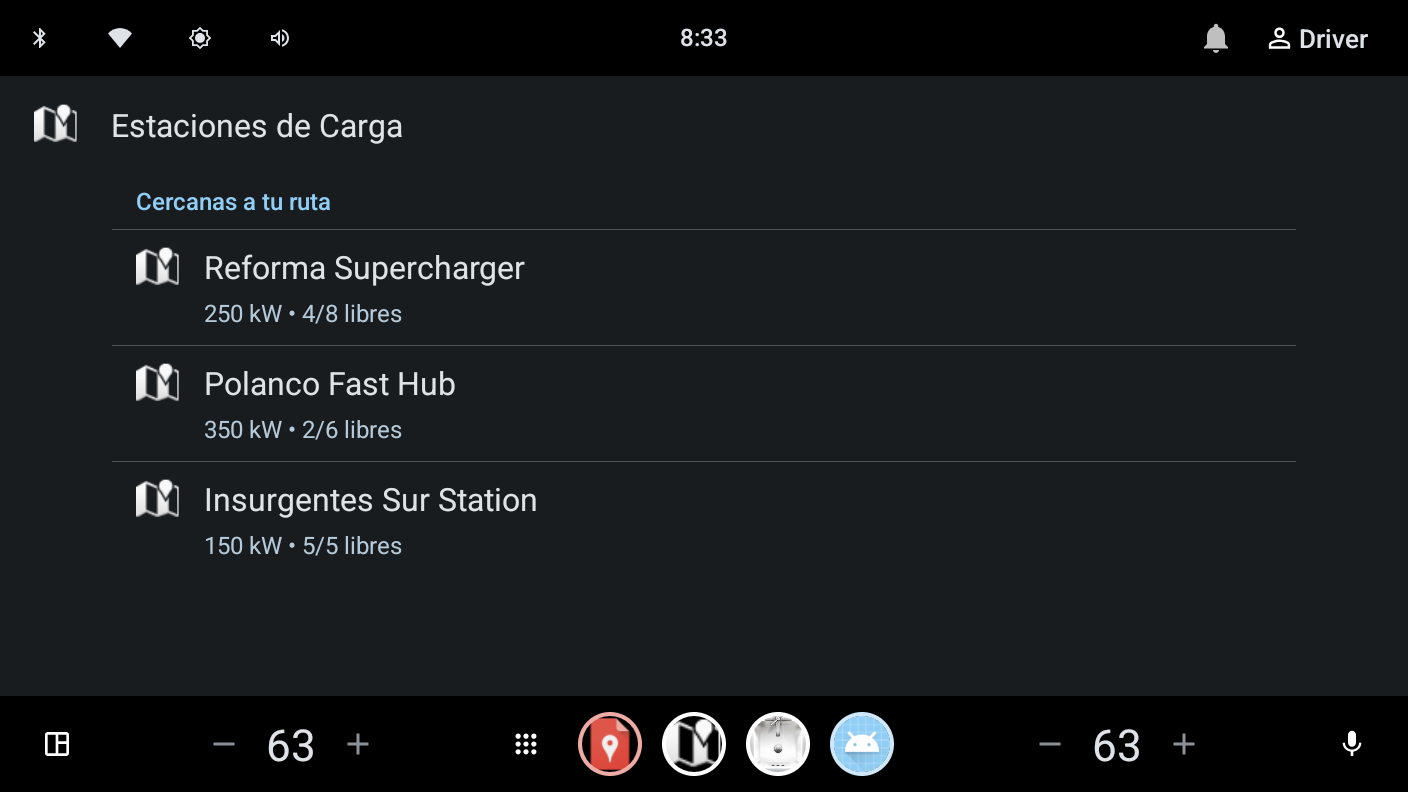
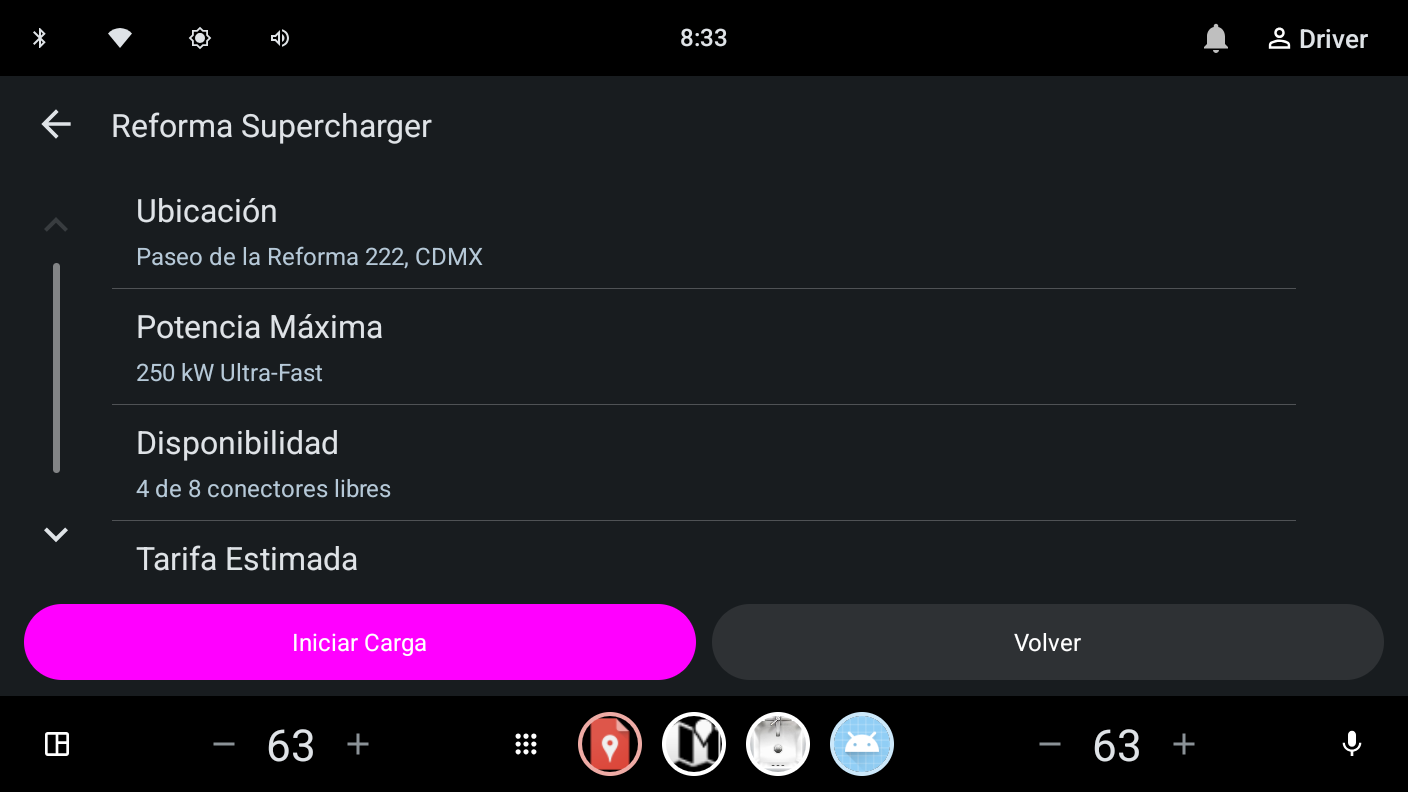
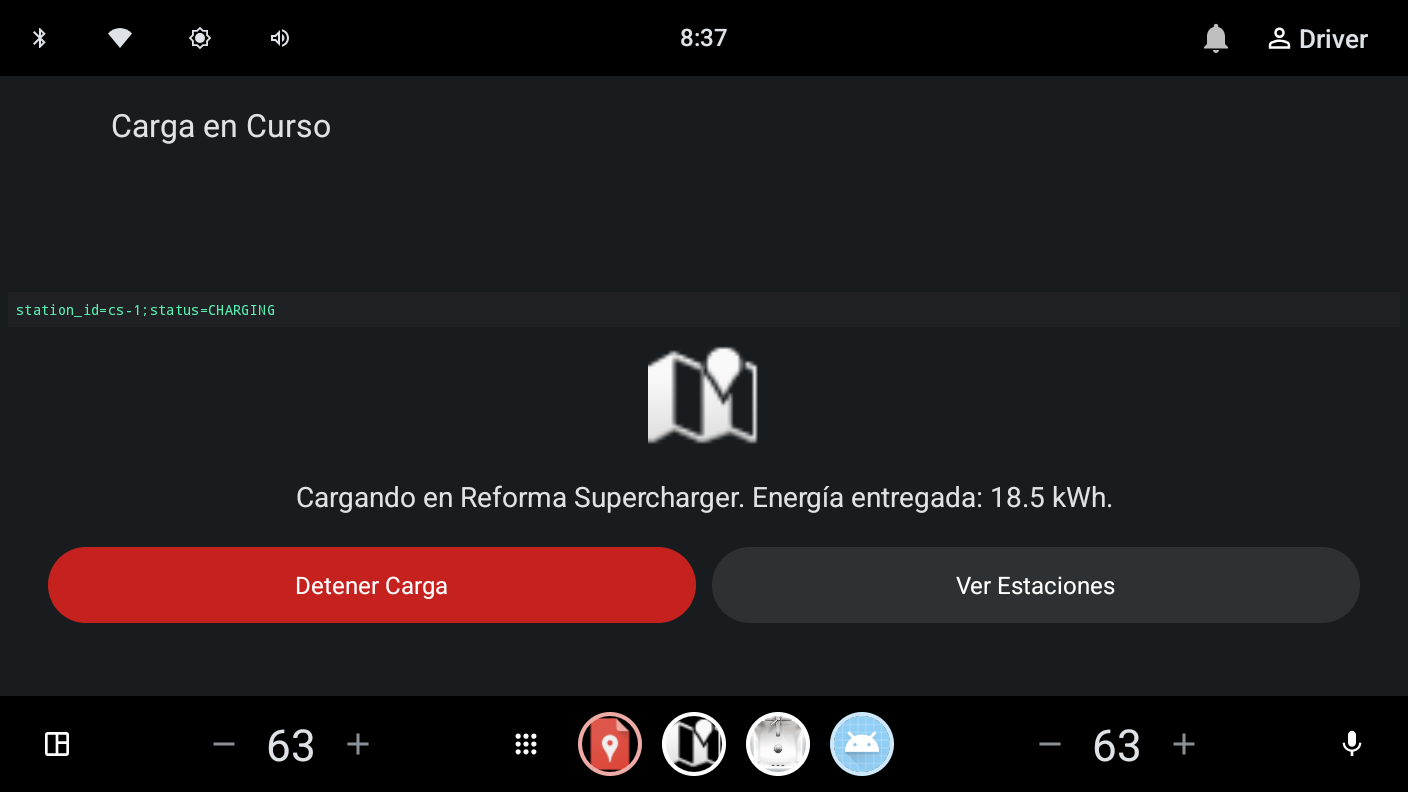
The sample app (:sample) has been verified live on the official Android Automotive OS emulator (Automotive_1408p_landscape display profile):
Station Directory (AutoListTemplate) |
Telemetry & Details (AutoPaneTemplate) |
Active Session (AutoMessageTemplate) |
|---|---|---|
 |
 |
 |
Adoption Paths
flowchart LR
    A["Need Automotive in KMP?"] --> B{"New or Existing App?"}
    B -->|Existing App| C["Import Library (:core)\nAdd io.github.kmpauto:core to commonMain"]
B -->|New Project| D["Use kmp-cli Scaffolding\nkmp create --template kmp-auto"]- Standalone Library (
:core): Ideal for teams with existing mobile codebases. Add the Maven Central coordinate tocommonMain.dependenciesand implement your in-car screens without rewriting your mobile shell. - Turnkey Starter Template: Ideal for greenfield automotive projects. Scaffolds complete multiplatform shells for Android Auto, Android Automotive OS, and Apple CarPlay with zero setup friction.
Roadmap & Milestones
| Milestone | Scope | Status |
|---|---|---|
| Milestone 1: Living Foundation | Gradle KMP setup, androidx.car.app 1.7.0, iOS CarPlay linking |
 Completed |
| Milestone 2: Navigation & Safety | AutoNavigator, AutoScreen, BackstackGuard (5-step limit) |
Completed |
| Milestone 3: Core Templates | AutoListTemplate, AutoGridTemplate, AutoPaneTemplate, AutoMessageTemplate |
Completed |
| Milestone 4: Native Platform Engines | AndroidTemplateMapper, IosTemplateMapper, reactive invalidation |
Completed |
| Milestone 5: Sample & AAOS Verification | Multiplatform EV Charging sample running live on AAOS emulator | Completed |
| Milestone 6: Advanced In-Car Templates | AutoSearchTemplate, AutoTabBarTemplate, AutoActionSheetTemplate |
 In Progress |
| Milestone 7: Interactive Showcase Suite | Dedicated showcase screen for every template in :sample |
In Progress |
Milestone 8: Apple CarPlay Shell (iosApp) |
Xcode project host with CPTemplateApplicationScene |
 Planned |
| Milestone 9: KMP CLI Template Packaging | Standalone template distribution via kmp create --template kmp-auto |
Planned |
Milestone 10: Official kmp-auto-expert Skill |
Automated agent skill with safety rules and diagnostic runbooks | Planned |
| Milestone 11: Maven Central Publishing | Formal release of io.github.kmpauto:core:1.0.0 |
Planned |
Related Projects & Resources
- KMP CLI & Zora Kits Hub: Unified CLI and Agent Skills Hub for Kotlin Multiplatform.
- kmp-auto Repository: Official source code and issue tracker.
- Android for Cars Documentation: Official Google guide for Android Auto and AAOS.
- Apple CarPlay Developer Documentation: Official Apple CarPlay framework and Human Interface Guidelines.